Guides · 2026-07-14
Finding your Fantrax secret ID
Fantrax connects to _.gm with a secret ID instead of a password — it grants read-only access, stays encrypted on our servers, and never reaches a browser or any AI service. Here’s where to find yours.
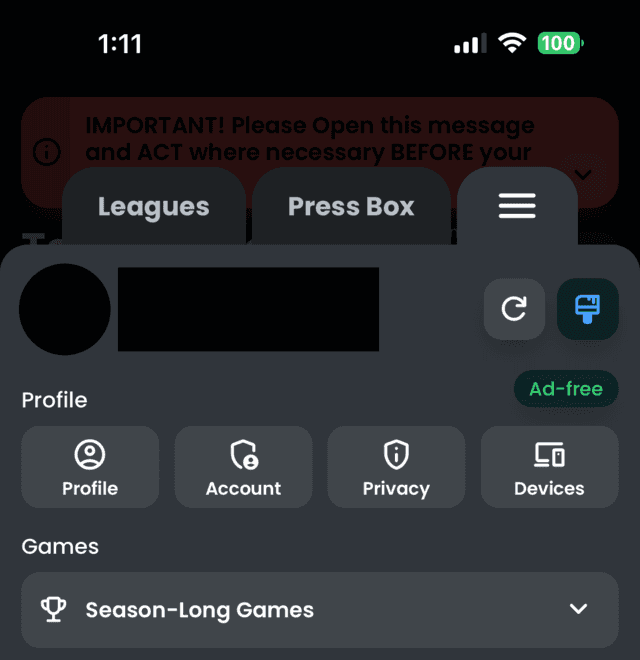
1 · Open the menu, then Profile
In the Fantrax app or site, tap the menu (top right), then tap Profile.
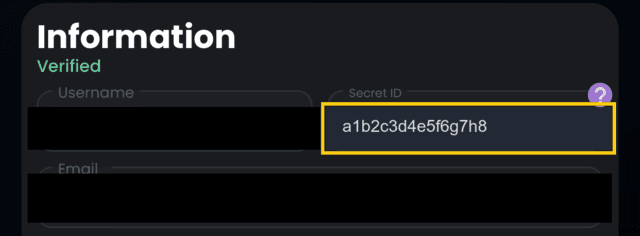
2 · Copy the Secret ID field
On the Profile page, under Information, you’ll see Username and Secret ID side by side. Copy the Secret ID value — that’s what goes in the _.gm setup flow.
Worth knowing
The secret ID grants read access to every league on your Fantrax account, not just one — so if you run multiple leagues, one ID is all _.gm needs to see them all when you set up each one.